













SkyrimNet
As featured on the NVIDIA Technical Blog and the NVIDIA Blog
Every NPC in Skyrim, brought to life with AI.
They talk, remember, react and act, voiced in real time.
Discord | YouTube | fateless.ai | GitHub
What is SkyrimNet?
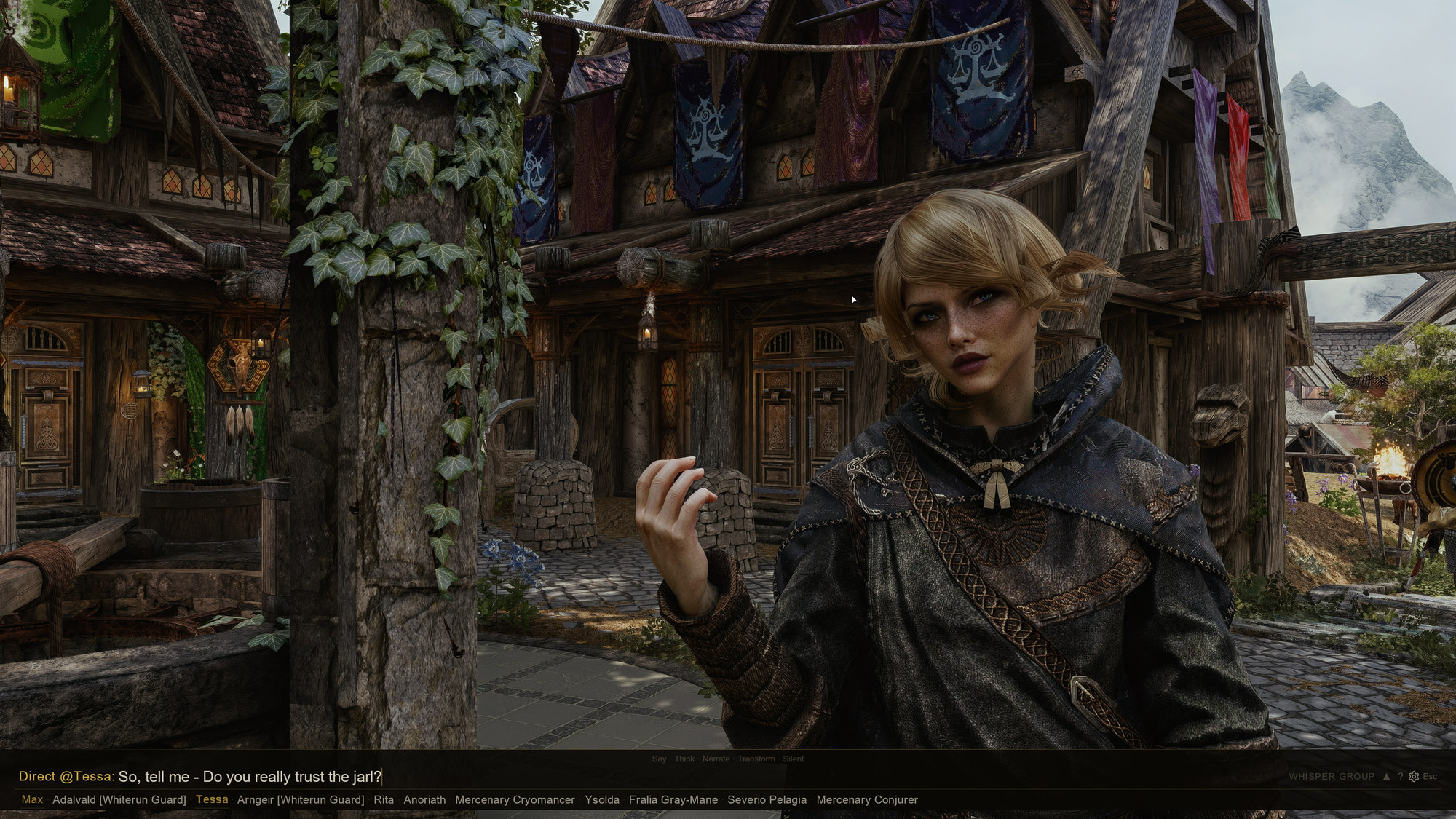
SkyrimNet turns every character in Skyrim into someone you can actually talk to. Speak into your microphone or type, and the NPC in front of you answers in their own voice, with their own personality, about what is happening right now.
NPCs remember. Each one keeps their own memories of what you did and said, and of what they saw happen around them, and brings them up later. They notice: they react to what they could plausibly see and hear, talk among themselves, and keep a scene going while you watch. And they act: an NPC can follow you, hand over gold, craft you a shield, draw a weapon or walk away, as the situation calls for, through a mix of SkyrimNet's built-in actions and its plugins.
It all runs as a single Skyrim mod. No separate app, no server window to keep open. Install it, launch the game, and you are talking to NPCs within minutes.
SkyrimNet is also a platform. Nearly 300 community plugins on the SkyrimNet plugin hub add new actions, followers, quests and awareness of the other mods you run, and anyone can build one with the modder API.
To date, SkyrimNet has had more than 30 publicly beta-tested releases across tens of thousands of playtesters, and is finally here on Modhold. Enjoy!
See it in action
SkyrimNet +Fateless Speed DemoJohn SkyrimNet visits the Bannered MareMore on the SkyrimNet YouTube channel.
Highlights
- Real conversations. Context-aware dialogue with any NPC, streamed so the voice starts while the reply is still being written. Hand-written bios for Skyrim's named characters, with more for popular mods in the Content Library.
- Memory. Every NPC has a private memory, recalled by meaning, that fades with time unless it mattered. NPCs can keep diaries too.
- Voices. Local and cloud text-to-speech engines, with voice cloning, plus voice effects for werewolves, draugr, ghosts and more.
- Speak or type. Speech recognition runs on your own PC, and an in-game chat overlay supports whispering, group talk and addressing NPCs by name.
- Actions. NPCs choose what to do as well as what to say, from a library that other mods can extend.
- Vanilla dialogue too. Your dialogue-menu picks are spoken in your voice, and NPCs can use their original quest lines when it fits.
- Vision. NPCs can see and comment on what you wear, carry and do.
- Bard songs. Bards compose and perform new songs about your adventures.
- Subtitles. Replacement subtitles you can place and style, optionally floating over NPCs' heads, with translations side by side and furigana or pinyin over the text (requires Magelight UI; not in VR).
- Built for modders. Papyrus and C++ APIs, YAML triggers and actions, and editable prompt templates fed with live game data.
Get started: choose your AI model
SkyrimNet needs a language model: the AI that writes what NPCs say. Pick any one of the options below. They all work, and none of them is required over the others. You can also mix them, for example a cloud model for dialogue and a local engine for voices.
Fateless (optional)
If you'd rather not manage API keys or local models, Fateless offers one account for everything SkyrimNet can use: dialogue, voices, speech recognition and bard songs, with models tuned for each job. Choose Fateless in the SkyrimNet settings and sign in. It's entirely optional; SkyrimNet works fully with either of the options below.
Your own cloud account
Use an OpenRouter key, or any OpenAI-compatible service. The setup wizard offers ready-made model presets: Budget, Balanced and Performance.
Run it locally on your RTX GPU
Free and private: the model runs on your own PC through LM Studio, Ollama, KoboldCpp or llama.cpp. Small local models such as NVIDIA Nemotron 3.5 Bolt are a great way to try SkyrimNet. Larger models give richer conversations.
- Setup help: see the #local-llm-discussion channel on our Discord.
- NVIDIA RTX Spark (Windows on Arm): install with the Arm build of Mod Organizer.
Install
- Download the main file from the Files tab.
- Install it with your mod manager (Mod Organizer 2, Vortex, ...), along with the requirements below.
- Enable SkyrimNet.esp in your load order.
- Launch the game through SKSE and open http://localhost:8080 in your browser.
- Follow the setup wizard. It picks working defaults for your PC and gets you talking. The default voice engine, PocketTTS, runs inside the game and downloads its models on first launch.
Stuck? Ask on Discord.
Requirements
- Skyrim Special Edition / Anniversary Edition, or Skyrim VR
- A CPU with AVX2 (almost any PC CPU from the last 10 years)
- Skyrim Script Extender (SKSE)
- Address Library for SKSE Plugins
- powerofthree's Papyrus Extender
- PapyrusUtil SE
- powerofthree's Tweaks (VR version), with its Load EditorIDs fix left on (the default)
- Prisma UI and its requirement Media Keys Fix SKSE, or Magelight UI, for the in-game chat and dashboard
- The latest Microsoft Visual C++ Redistributable
- A language model: Fateless, your own cloud key, or a local model (see "Get started" above)
Click to expand:
Spoiler
Optional- UIExtensions, for the input wheel.
- Phantasm 1.0 or later, for OmniSight to draw characters off screen and to describe items at all: item pictures come only from Phantasm. SeverActions ships an older copy; let Phantasm win that file conflict.
- CUDA Toolkit 12.x (not 13.x), to speed up speech recognition on NVIDIA GPUs. Restart your PC after installing it. The Speech-to-Text test on the Test & Easy Setup page shows whether CUDA is in use.
- Skyrim VR ESL Support, instead of BEES
- Skyrim VR Refocused, or a similar mod that keeps Skyrim focused
- MFG Fix NG
Built on SkyrimNet
SkyrimNet's modder API has a growing ecosystem. Two major mods built on it:
- SeverActions: an AI-first follower framework, with rapport, trust and mood per companion, companion banter, and 70+ actions from crafting to a full crime-and-arrest system.
- IntelEngine: NPCs that travel the world on your command and on their own and keep appointments, with an AI Dungeon Master that creates quests, ambushes and faction wars on the fly.
- See SkyrimNet's Plugin Hub for a more comprehensive list of plugins that have been created for the platform.
For modders and developers
- Example plugins: SkyrimNet-ExamplePlugin has small, complete Papyrus and C++ plugins to clone and build from.
- Modding guides: docs/modding covers actions, triggers, prompts and mod integration.
- APIs: the Papyrus API (SkyrimNetApi), the C++ API, and an MCP server for AI tools. See FEATURES.md.
- Contributing: CONTRIBUTING.md, including how to build the plugin.
Community
- Discord: discord.gg/gHHS7HpJS9, for help, news and your stories
- YouTube: @SkyrimNet
- Fateless: fateless.ai
- NightCityNet: a sister project for Cyberpunk, built on the Fateless engine. Independently operated, not by us. Join its Discord.
AI Usage in Development
SkyrimNet uses AI-assisted development, following the current best practices for agentic software engineering that are utilized by Google, Facebook, Meta, and others. AI is heavily involved with the development of this software, but ultimately every single line of code is human reviewed.
Credits
- The community of developers who build SkyrimNet: code, design, testing and ideas.
- The SkyrimNet community, for the hand-written character bios.